
G3020, vertical antenna, 4Watts. Hey -not bad for a bunch of old fashioned through hole components!
73 Nick VK2DX

The 20 KHz of amateur band segmnet (plus more above 10.150 KHz) were completely wiped out by one massive signal. Could this be over-the-horizon radar, and if it is, which one? Regardless, for years of playing with radios, I have never seen/heard such a powerful signal, on any band!

And right there, in the middle of OTHR was one single WSPR signal, wiggling it's way to my receiver. G3020 you've done it again. Amazingly cool stuff !

UPDATE: 3 hours later, with no sky-wave propagation, the OTHR was still loud and clear. A local radar perhaps?


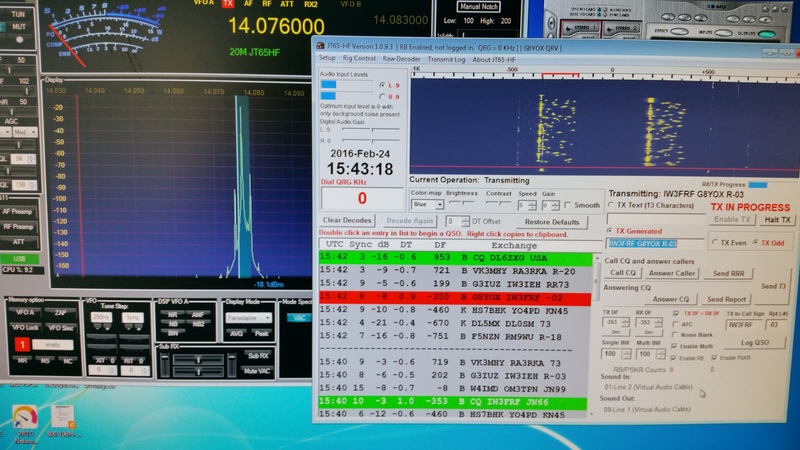
So here is the list of all G11 DIY radios assembeld so far;
[Builder's callsign, date and first-QSO call]
-------------------------------
G11 #1 K9GQ 20 AUG 2015 KB0PPQ
G11 #2 VK2AMS 20 SEPT 2015 VK4WI
G11 #3 VK2DX 31 DEC 2015 CT1FBK
G11 #4 KF5KOG 5 JAN 2016 KD7H
G11 #5 AB4GS 24 JAN 2016 KB0PPQ
G11 #6 G8YOX 26 JAN 2016 IW3FRF
As said before, this Asian carrier is visible in VK from 10 UTC (9pm local time) to after midnight. Perfect time to play radios! The carrier is present every night and it is spot-on on 10.140 which makes the calibration piece of cake.
1. Turn on G3020, set mode to USB, filter bandwidth to 2.7KHz and main dial frequency to 10.138 KHz

2. start WSJT-X, set mode to JT65 and set frequency to 10.138. [I assume here that WSJT and G3020 audio are 'connected' via VAC]
3. Under Setup-Hardware-Genesis Configuration set local oscillator [LO] frequency to 10.125000.
Let the WSJT receive for a few minutes. You should be able to see a 'line' which is your Asian carrier somewhere around 2000 Hz point. In my case the yellow carrier line was just above 1800 Hz point.

To calibrate G3020 I want to 'shift' carrier up. To do so, I need to add 200Hz to local oscillator frequency: 10.125000 + 200 = 10.125200. (you will enter the difference you see on your WSJT spectrum. If carrier is above 2000 mark then deduct the difference)

4. click Apply and let the WSJT run for another minute or so. The yellow carrier is now almost spot on on 2000 Hz mark. Actually it is bit too high so I've deducted 5Hz. My new LO value is 10.125195. Apply and Save.

Of course you can use WSJT and know time/frequency signal to calibrate any Genesis hardware. I just prefer to use Asian carrier because it is neither too strong nor too weak and with the help of calibrated WSJT waterfall it is easy to work out the LO frequency +/- 1Hz.
Again, my apology if this is too trivial, but until you calibrate your hardware you won't be able to receive weak WSPR signals. Of course you can use your 'big radio' as signal source assuming the radio itself is calibrated.
Unlike all previously tested adapters, this one even came with the box! And the instruction manual, pin layout schematic, disc with drivers. There was even manufacturer's label: IOCrest, RS-232. And as added bonus: 3 status LEDs" active, txd and rxd. Plus 1 year Australian guarantee!
The device got recognized by Win7 straight away. I wanted to halt the automatic driver search process but wasn't fast enough. Nevertheless, the drivers were loaded and device was 'ready to use'. And it was- from the moment it was set as COM port in GSDR, it worked flawlessly. No hang-ups, no 'muffled TX' no fake PTT attempts. Exactly as you want it, on each transmission, every time. Driver date: 22 Jan 2016!
If you wonder why am I so excited about such a trivial device like com port adapter then you are either smart and already have an FTDI unit, or you are yet to discover that 230x and CH340 chips with Windows 7 are pain in the bum. A $1 Chinese clone may sound like a great deal but you will regret it.
I am awaiting delivery of couple more units so stay tuned for more reviews.
So far, IOCrest and COM1 from mb (as per Stew's suggestion) are clear winners.
Price: AUD $32, free postage, Australian vendor.
1 year guarantee.
ebay auction: http://www.ebay.com.au/itm/331650027323
[note: COM port is required for G40 and G3020 units only, G59 and G11 are connected via USB)
73 Nick VK2DX


 late afternoon, 20m band - and dozens and dozens of European stations on RTTY
coming via the long path. The antenna is pointed over Pacific,
practically no noise. Some signals are strong, other weak but perfect decode.
With SDR there is no tuning- it is just a matter of clicking on the signal
as it appears, and you call before anyone else. Also if you wish to call
you see exactly where to park your signal on a crowded band. Almost too easy!
late afternoon, 20m band - and dozens and dozens of European stations on RTTY
coming via the long path. The antenna is pointed over Pacific,
practically no noise. Some signals are strong, other weak but perfect decode.
With SDR there is no tuning- it is just a matter of clicking on the signal
as it appears, and you call before anyone else. Also if you wish to call
you see exactly where to park your signal on a crowded band. Almost too easy!
[Builder's callsign, date and first-QSO call]
G11 #1 K9GQ 20 AUG 2015 KB0PPQ
G11 #2 VK2AMS 20 SEPT 2015 VK4WI
G11 #3 VK2DX 31 DEC 2015 CT1FBK
G11 #4 KF5KOG 5 JAN 2015 KD7H
G11 #5 AB4GS 24 JAN 2015 KB0PPQ
My first contact with G11 #3 was on JT65 mode with CT1FBK from Portugal. Easy!


GBOX is an aluminium die-casting enclosure with dimensions 240 x 240 x 90mm. There is plenty of room to accommodate a 100W amplifier as well.


